AARP SafeTrip™
- 4.3
- Rating
- 100.00K
- Installs
- Free
- Price

 Analysis by App-foxy
I approached AARP SafeTrip™ as a driver who wanted more awareness behind the wheel, not another complicated dashboard competing for attention. It is a free Android app in the Auto & Vehicles category from AARP, aimed at helping people build safer driving habits through a smarter view of everyday trips. That focus matters: this is less about replacing navigation and more about giving driving behavior a little more attention.
My overall impression is positive, but conditional. The app makes the most sense for someone who wants to reflect on how they drive, especially during ordinary commutes, errands, and family trips. It is not the first tool I would choose for turn-by-turn directions, roadside assistance, or a complete vehicle-management system. If you understand that distinction before installing it, the experience is easier to judge fairly.
What I would consider before installing it
The first decision is whether you want feedback about driving habits or simply help getting from one place to another. Navigation apps are built around routes, traffic, and destinations. Vehicle apps often focus on maintenance, fuel, or ownership tasks. SafeTrip sits in a different space: it is intended to encourage more aware driving. That makes the personal goal important. If you are willing to look back at your trips and use the information to adjust your behavior, the app has a clear purpose. If you only want directions, it may feel unnecessary.
You May Also Like

 Google Keep - Notes and lists
Google Keep’s Quiet Growth Shows the Appeal of Simpler Notes
As mobile work gets busier, Google Keep keeps winning a simple contest: capture a thought quickly, find it later, and get on with the day.

 Blood Strike: 2.5 Anniversary
Blood Strike’s Loadouts Turn Every Drop Into a Tactical Gamble
A close look at Blood Strike’s custom loadouts: how fast access to signature weapons reshapes its battle royale rhythm, rewards preparation, and narrows the gap between fights.

 Pandora - Music & Podcasts
Pandora’s Music Is Easy to Start, but Harder to Recover
Pandora’s strength is its low-effort path from a seed to a station. Its weak spot is how much confidence it asks you to place in connection, setup, and quiet recovery.

 8 Ball Pool
 Is Built on Rivalries, Rematches, and Routine
A close look at the rivalries, rematches, shared routines, and unanswered safety questions that turn a quick pool match into a persistent mobile community.

 Samsung Music
’s Quiet Strength Is Playing What You Already Own
Its reach comes less from spectacle than from dependable access to a personal library. That simplicity is both the app’s strongest retention engine and its ceiling.

 AccuWeather: Weather Radar
AccuWeather Review: A Quick, Clear Forecast for Everyday Decisions
For everyday plans, the best forecast is the one you can understand quickly. AccuWeather makes rain timing, radar, and local conditions easy to act on, with a few trade-offs.
More From Our News Desk



I would also think about how consistently you drive. A single installation will not tell you much about your routine. The useful part comes from making it part of your normal driving pattern, then noticing whether certain situations repeatedly affect your concentration or smoothness. A short commute can be more revealing than an occasional long journey because it gives you a familiar comparison point.
Device compatibility is straightforward for many Android users because the app requires Android 8.0 or later. It is available at no charge, carries an Everyone content rating, and has reached over one hundred thousand installs. Those details make it relatively easy to try without a financial commitment, while the age rating keeps it suitable for a broad audience.
Its public reception is encouraging rather than overwhelming. SafeTrip holds a 4.3 average from around three hundred fifty ratings, with roughly one hundred twenty-five written reviews. I would treat that as a useful signal of general satisfaction, not proof that every driver will have the same experience. Driving habits, phone setup, and willingness to review feedback all affect whether an app like this feels valuable.
How I would use it during a normal week
My preferred approach would be to install it before a regular week rather than testing it only on a special road trip. I would use the same phone position each time, keep the device secure, and avoid interacting with the screen while moving. Consistency matters because changing where the phone sits or how I handle it can make the experience less comparable from one drive to another.
Imagine a weekday scenario: I leave home in a hurry, take the same route to work, and later drive back during heavier traffic. Instead of judging the app after one trip, I would look for patterns across those two situations. The morning may expose rushed decisions, while the evening may reveal how fatigue or congestion affects my attention. That comparison is more useful than treating one result as a permanent verdict on my driving.
A second practical use is sharing the idea with a new driver in the household. I would not present the app as a scorecard or use it to criticize someone after every trip. A better workflow is to agree on one habit to improve, such as staying calmer in traffic or avoiding unnecessary phone interaction, and then use the app as a conversation starter. That turns the technology into a coaching aid instead of a source of tension.
There is also value in using it before and after a deliberate change. For example, I might establish a normal routine, then begin leaving earlier to reduce rushing. If the driving experience feels different afterward, the app can support that reflection. The important insight is that safer driving is often shaped by preparation and habits outside the vehicle, not just by what happens once the engine is running.
Where the app earns its place
The strongest part of SafeTrip is its narrow purpose. Because it is centered on driving awareness, it can encourage me to pay attention to behavior that navigation apps usually leave in the background. A map can tell me where to turn, but it does not necessarily make me think about how calmly or consistently I am handling a familiar route. SafeTrip is more relevant when the destination is not the main problem.
I also like the low-risk entry point. Since the app is free, I can test whether its approach fits my routine without buying hardware or committing to a paid service. That is especially helpful for someone who is curious about driving feedback but does not yet know whether they will actually review it. The real cost is attention and consistency, not an upfront purchase.
Another strength is its potential to make ordinary trips more intentional. Drivers often reserve safety thinking for long journeys, bad weather, or stressful traffic. A tool focused on habits can shift that attention toward the repeated trips where routines are formed. I would find that more useful than a dramatic one-time reminder because small decisions during familiar drives are easy to overlook.
The AARP connection may also make the app feel approachable for people who are not interested in enthusiast-focused vehicle technology. Its presentation is easier to understand when the goal is simply becoming a more aware driver. I would recommend it particularly to adults who want a gentle way to review their driving, families discussing safer habits, and people who prefer a free trial before considering more involved solutions.
Practical habits that make the feedback more useful
First, I would decide what question I want the app to help me answer. “Am I a safe driver?” is too broad and can make any result feel personal. A better question is, “Do I drive differently when I am rushed?” or “What changes on my evening commute?” Specific questions make the experience more actionable and reduce the temptation to obsess over a single outcome.
Second, I would review trips when parked, not immediately while arriving at a destination. This sounds obvious, but it changes how seriously I take the information. Looking at a phone in a driveway or parking space gives me room to think. It also prevents the app from becoming another reason to handle the device at the wrong moment.
Third, I would keep a simple mental note of outside conditions. Traffic, weather, passengers, unfamiliar roads, and time pressure can all affect a drive. If I ignore those factors, I might blame myself for a difficult trip or dismiss a useful pattern as random. SafeTrip works best as part of personal reflection, not as an isolated judge that explains everything.
Finally, I would change one habit at a time. Trying to correct every aspect of driving at once is frustrating and makes it difficult to know what helped. A focused adjustment, followed by several comparable trips, offers a clearer way to decide whether the app is helping me act differently.
When another kind of app may be better
SafeTrip is not a universal replacement for the usual driving tools. If my main need were live route guidance, I would choose a dedicated navigation app because that category is built around maps and directions. If I wanted reminders about servicing, fuel records, or vehicle expenses, I would look toward a car-management app instead. Those alternatives may fit better because their central tasks are different, not because SafeTrip is failing at its own.
I would also hesitate to recommend it to someone who wants instant, highly detailed technical analysis of the car itself. A driving-awareness app and a diagnostic tool answer different questions. Drivers who care most about mechanical readings, maintenance schedules, or vehicle data should compare products on those capabilities rather than expecting SafeTrip to cover them.
There is a similar trade-off with dedicated hardware. A separate device may appeal to someone who wants the phone to remain completely out of the driving experience. SafeTrip is more convenient for trying the concept with an existing Android phone, but convenience can depend on how comfortable the user is with phone-based tools and whether the setup remains unobtrusive. I would never position any phone feature as a reason to touch the device while moving.
The app may also be a weak fit for a driver who will never review or act on feedback. Installation alone does not create safer habits. If I know I am unlikely to look back at trips, discuss patterns, or make a small change, a navigation app or a simpler reminder may serve me better. SafeTrip rewards curiosity and follow-through more than passive use.
Another limitation is that personal driving feedback can be easy to overinterpret. A difficult journey does not automatically mean I am a poor driver, and a smooth trip does not guarantee that every decision was ideal. I would use the app to notice trends, not to make absolute claims about myself or another person. That distinction is especially important when using it with family members or newer drivers.
What switching really involves
Moving from a navigation-first routine to SafeTrip is not mainly a financial decision because the app is free. The bigger adjustment is mental: I have to accept that the destination is no longer the only thing being measured in my own review of a trip. I need to make room for reflection, establish a consistent phone setup, and decide how to respond to what I notice.
There is also a small workflow cost. I would need to remember to use the app as part of my driving routine, keep my attention on the road, and review information only when safely parked. That is manageable, but it is still a habit. People who want something completely automatic and invisible may find the commitment less appealing than those who actively want to work on their driving.
I would avoid switching all at once if I already rely heavily on another app. Instead, I would first identify what that existing tool does well and keep it for that purpose. SafeTrip can be evaluated alongside a navigation or vehicle app because its role is different. This approach makes it easier to see whether it adds useful awareness instead of creating confusion or duplicate routines.
For families, the cost of switching includes agreeing on how results will be discussed. I would set a respectful rule: the app is for learning, not surveillance or punishment. That single decision can determine whether a household keeps using it. A driver who feels judged may stop engaging, while someone who feels supported may use the feedback constructively.
My recommendation for different drivers
I recommend giving SafeTrip a try if you want to become more conscious of your driving habits, prefer a free Android option, and are prepared to review your trips calmly. It is particularly suitable for regular commuters, families encouraging safer routines, and drivers who want something more reflective than a map but less specialized than a full vehicle-management system.
I would skip it if your only requirement is dependable navigation, mechanical diagnostics, roadside help, or detailed car ownership records. In those cases, a purpose-built alternative is likely to feel more useful from the first day. I would also skip it if using a phone-based driving tool would tempt you to interact with the screen while driving; no feedback is worth compromising attention on the road.
The current release is identified as aarp-v3.0.3.0-93872-g4272808-prod, and the app was released on November 22, 2022. I mention that because users who maintain older phones should check that their device meets the Android requirement before planning a trial. For compatible users, the free installation makes experimentation simple.
After testing the idea in my own routine, I see AARP SafeTrip as a focused habit-building companion rather than an all-purpose driving app. Its best quality is that it asks me to look at the quality of everyday driving, not just the success of reaching a destination. If you want practical self-awareness and are willing to turn feedback into one small change at a time, it is worth trying. If you need directions or vehicle administration, choose the category that matches that job instead.
FAQs for AARP SafeTrip™
01What is AARP SafeTrip™ and how does it work?
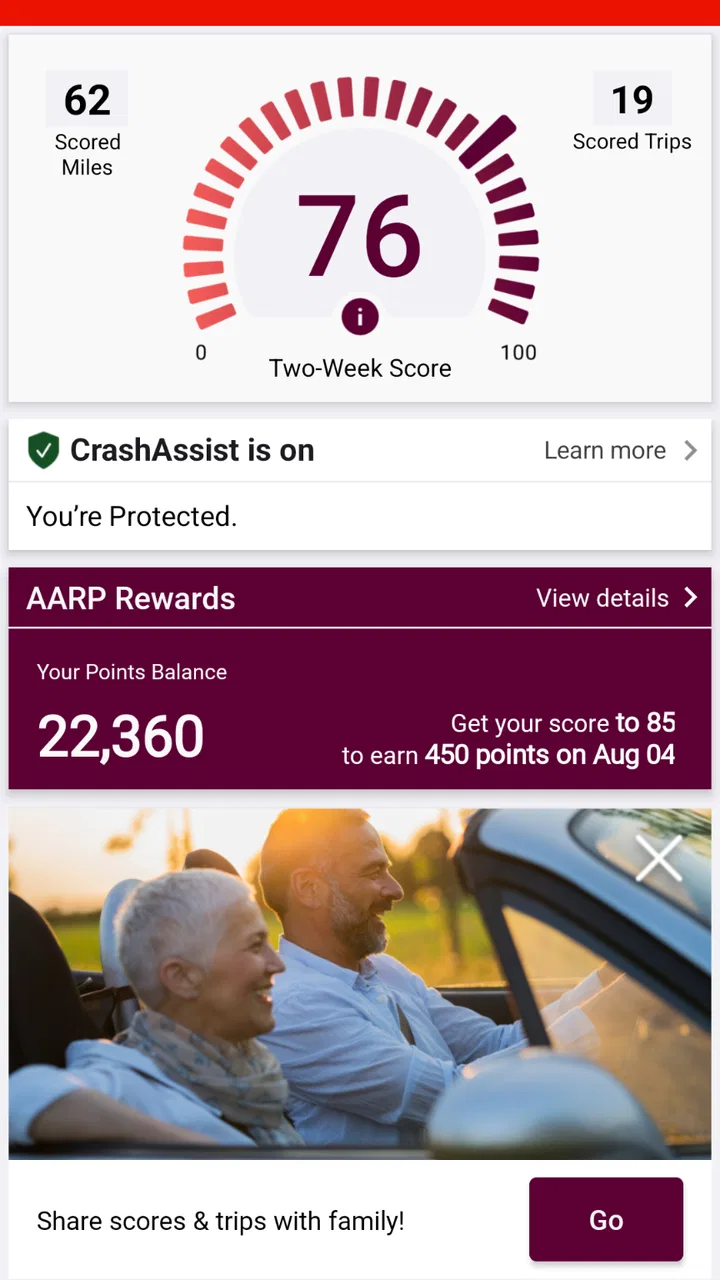
AARP SafeTrip™ is an app designed to enhance driving safety and provide peace of mind for users. It offers real-time driving feedback, tracks trip details, and provides emergency assistance features. Users can receive personalized driving tips and a driving score to help improve their on-road habits.
02Is AARP SafeTrip™ available for both Android and iOS devices?
Yes, AARP SafeTrip™ is available for download on both Android and iOS platforms. You can easily find and install it from the Google Play Store for Android devices and the App Store for iOS devices. Ensure your device meets the app's compatibility requirements for optimal performance.
03Does AARP SafeTrip™ require a subscription or membership?
While AARP SafeTrip™ is available to everyone, AARP members may have access to additional features or discounts. It’s best to check the app’s description or AARP’s website for detailed information about any membership benefits associated with the app.
04How does AARP SafeTrip™ ensure user privacy and data security?
AARP SafeTrip™ prioritizes user privacy and employs robust security measures to protect personal data. The app collects only essential information needed for its functionality, and data is encrypted to safeguard against unauthorized access. Users can review the privacy policy within the app for more details.
05Can AARP SafeTrip™ provide emergency assistance during a trip?
Yes, AARP SafeTrip™ includes features to assist in emergencies. The app can quickly connect users to emergency services or roadside assistance if needed. It’s designed to offer support and ensure user safety while traveling, providing added peace of mind on the road.
Pros
- User-friendly interface for easy navigation.
- Provides real-time driving feedback.
- Customizable alerts for safer driving.
- Tracks trips for insurance discounts.
- No subscription fees required.
Cons
- Limited to certain geographic regions.
- Requires constant GPS access.
- May drain battery quickly.
- No offline mode available.
- Limited support for older devices.

AARP SafeTrip™
Gallery